


Horror is having a moment. In 2026, the genre is especially well-represented: new blood is dominating the box office through films like Backrooms and Obsession, established names like Sam Raimi and Damian McCarthy are at the top of their game, and long-running franchises like 28 Years Later and Resident Evil continue to stay relevant. But the most impressive piece of horror this year might just be found in the world of TV comedy: Widow’s Bay, a series that manages the delicate balance of mixing scares with laughs, while also doubling as a loving tribute to the genre. It’s the kind of combination that often doesn’t work, which is part of what makes the show so remarkable.
Technology
Why physical ID theft is harder to fix than credit card fraud


NEWYou can now listen to Fox News articles!
It started with a voicemail from a Hertz rental car location in Miami, Florida. A 57-year-old woman in Los Alamitos, California, was asked when she planned to return a Mercedes-Benz she had never rented. A thief had stolen her driver’s license, replaced the photo with their own and used it to rent the vehicle. The same identity was used to open a credit card account, book airline tickets and reserve hotel stays. By the time she learned what happened, the fraud involved businesses in multiple states.
Clearing her name required police reports in two jurisdictions, written disputes with the credit card issuer and repeated contact with the rental company and hotels. Her accounts were frozen while she submitted notarized copies of her identification and signed fraud affidavits. The process lasted more than a week. She reported losing $78,500 and spent nearly 10 days dealing with the fallout from one stolen ID.
Credit card fraud is usually limited to a single account number. Physical ID theft gives someone the ability to act as you in the real world. As a result, the cleanup process is longer, more intrusive and often tied to your legal record.
Sign up for my FREE CyberGuy Report
Get my best tech tips, urgent security alerts, and exclusive deals delivered straight to your inbox. Plus, you’ll get instant access to my Ultimate Scam Survival Guide — free when you join my CYBERGUY.COM newsletter.
5 MYTHS ABOUT IDENTITY THEFT THAT PUT YOUR DATA AT RISK
A stolen driver’s license can allow someone to rent cars, open accounts and sign contracts in your name. (Photo by Silas Stein/picture alliance via Getty Images)
How credit card fraud recovery works
Under the Fair Credit Billing Act, you report unauthorized charges to the card issuer within 60 days of the statement date. Federal law limits your liability to $50, and most major issuers waive that entirely. The bank cancels the compromised card number, issues a replacement and removes the disputed charges after an investigation. You may need to confirm transactions and sign a fraud affidavit. The account number changes. Your name, driver’s license and Social Security number stay the same. In most cases, fraud is resolved within one or two billing cycles. That structure gives consumers clarity. There is one issuer, one investigation and one account to correct.
Why physical ID theft recovery is more complicated
Physical ID theft creates problems that go far beyond one financial account. When someone uses your driver’s license, they step into your legal identity. Start with reporting requirements. Most states require you to file a police report before the DMV will issue a replacement linked to fraud. That report number becomes part of your official record. If the misuse happened in another state, you may need to file a second report there.
Next, understand what replacing the card actually does. A new physical card does not erase prior activity. Rental contracts, utility accounts, hotel stays, or police interactions tied to the stolen license still carry your name and license number. Fixing those records takes work. You must contact each business directly and submit documentation. No central agency reverses everything at once. Each company sets its own rules and timeline.
The stakes can rise quickly. For example, if someone abandons a rental car or commits a crime using your stolen ID, law enforcement databases may record your name. At that point, the situation shifts from financial inconvenience to legal exposure.
HOW TO PROTECT A LOVED ONE’S IDENTITY AFTER DEATH
Police reports and formal disputes are often required before businesses will remove fraudulent records. (Kurt “Cyberguy” Knutsson)
How to prove physical ID theft was not yours
With credit card fraud, the issuer investigates the charge. With physical ID theft, businesses and agencies often require you to prove that you did not authorize the activity. That process usually starts at IdentityTheft.gov. The FTC generates an Identity Theft Report, which serves as an official statement of fraud. Most banks, collection agencies and rental companies will not proceed without it.
You may also need:
- A local police report
- A copy of your driver’s license
- A notarized identity affidavit
- Proof of residence tied to the date of the fraud
When thieves open fraudulent accounts in your name, dispute each one separately. Act quickly. Send a written response within 30 days of the first collection notice to protect your rights under federal law. Fraud that appears on your credit report requires another step. Contact Equifax, Experian and TransUnion individually and submit formal disputes with supporting documentation. The credit bureaus then have up to 30 days to complete their investigations. No central agency manages these corrections for you. Instead, every company sets its own documentation rules and timeline. Therefore, you must track deadlines, follow up consistently and keep detailed records of every communication.
You cannot simply replace your driver’s license number after identity theft
When a credit card number is stolen, the bank issues a new one. When a driver’s license is stolen, the number usually remains the same. In California, if your driver’s license is lost or stolen, you can request a replacement card through the DMV online system or at a field office. The official process gets you a new physical card. No new license number is automatically assigned when the card is stolen.
If there is identity misuse tied to the license number, the DMV fraud review process allows you to submit documentation, including police reports, to support an identity theft claim before they take further action. A Social Security number is even harder to change. The Social Security Administration approves new numbers only in cases involving continued harm. Applicants must provide extensive documentation and appear in person.
A stolen physical ID, such as your license, includes:
- Full legal name
- Date of birth
- Address
- Driver’s license number
- Signature
That information is sufficient for in-person identity checks, rental contracts, certain loan applications and travel-related transactions.
Credit monitoring alerts can help you detect identity misuse before it spreads across multiple accounts. (Kurt “CyberGuy” Knutsson)
Why ongoing identity protection matters
There is no single agency that tracks misuse of your driver’s license across rental companies, lenders, collection agencies and law enforcement systems. That burden falls on you.
Identity theft services monitor your identity across all three credit bureaus and alert you to new credit inquiries, account openings and changes to your credit file. If fraud appears, you are assigned a dedicated U.S.-based case manager who helps:
- File disputes with Equifax, Experian and TransUnion
- Prepare and submit FTC Identity Theft Reports
- Contact creditors and collection agencies
- Track documentation deadlines and responses
- Assist with reimbursement claims when eligible
Plans can include identity theft insurance of up to $1 million per adult to cover eligible expenses such as lost wages, legal fees and document replacement costs related to identity theft recovery.
No service can prevent every misuse of a stolen ID. But when the issue involves police reports, credit bureaus, tax agencies and collection accounts, having structured support can make all the difference.
The California woman in this case was not enrolled in an identity theft protection service. Some businesses may reverse fraudulent charges, but it is unclear whether she recovered the full $78,500.
See my tips and best picks on how to protect yourself from identity theft at Cyberguy.com
CLICK HERE TO DOWNLOAD THE FOX NEWS APP
Kurt’s key takeaways
Credit card fraud follows a defined path. You report the charge, the issuer investigates and your account number changes. In most cases, the disruption ends there. Physical ID theft moves differently. It spreads across rental companies, hotels, credit bureaus and sometimes law enforcement databases. Instead of one dispute, you may face several. Instead of replacing a number, you must protect a permanent identity marker tied to your name. That shift matters. A stolen driver’s license carries your legal identity into the real world. Therefore, recovery demands documentation, patience and persistence. Each business sets its own rules. Each agency runs its own timeline. You coordinate the process. The lesson is clear. Protecting your financial accounts is critical. However, protecting your physical identification may be even more important. Once someone uses it in person, the cleanup becomes personal, procedural and time-consuming. Layered monitoring, early alerts and fast reporting reduce long-term damage. The faster you respond, the more control you keep.
Have you ever dealt with physical ID theft, and did the recovery process take longer than you expected? Let us know your thoughts by writing to us at Cyberguy.com
Sign up for my FREE CyberGuy ReportGet my best tech tips, urgent security alerts, and exclusive deals delivered straight to your inbox. Plus, you’ll get instant access to my Ultimate Scam Survival Guide — free when you join my CYBERGUY.COM newsletter.


We’re doing our best to mitigate the huge increases that are being passed to us, and we’ve been trying to shield our customers from the increases, but the situation has become unsustainable.
Cook doesn’t say when Apple plans on raising prices or which products will be affected. The company has already stopped selling the Mac Studio with 512GB of RAM in March and later raised the starting price of the Mac Mini to $799 after dropping the cheaper $599 option from its lineup. Analyst Tim Culpan also suggested that Apple could discontinue the base configuration of the MacBook Neo, while keeping the $699 model with 512GB of storage.
As AI companies continue to demand more memory in their sprawling data centers, suppliers are struggling to keep up. The shortage has led to surging RAM and storage costs, as well as price increases across game consoles, laptops, and other devices.
“There’s less supply at a time when consumers want devices and the memory guys are passing along huge price increases,” Cook tells the WSJ. “We definitely need memory pricing and supply to return to reasonable levels for consumer products.”
Apple is getting ready to take the wraps off its latest lineup of iPhones later this year, though it’s unclear how big an impact the memory shortage will have on pricing. The WSJ estimates that the upcoming iPhone 18 Pro could cost $1,299, a jump from the $1,099 iPhone 17 Pro.

Empty Waymo vehicles swarm Atlanta neighborhood
Atlanta residents captured alarming video of dozens of Waymo driverless cars continually circling their quiet neighborhood for hours. Tech expert Kurt Knutsson warns this ‘AI takeover’ raises significant safety concerns, especially for children, highlighting a critical lack of human intervention and company accountability from Waymo regarding these autonomous vehicles and potential glitches.
NEWYou can now listen to Fox News articles!
A getaway car with no driver? That is a new one. Police say that is what happened outside Hot 8 Yoga in San Francisco’s Marina district. Police records reportedly show that a burglar slipped inside the studio, grabbed activewear and got out in under three minutes. Waiting outside was a Waymo robotaxi.
The suspect allegedly loaded the stolen clothing into the trunk, climbed in and rode away as if the whole thing were a normal pickup.
That is what makes this case so wild. A basic burglary suddenly turned into a bigger question about self-driving cars, privacy and police evidence. What happens when a robotaxi becomes part of a crime scene?
Sign up for my FREE CyberGuy Report
- Get my best tech tips, urgent security alerts and exclusive deals delivered straight to your inbox.
- For simple, real-world ways to spot scams early and stay protected, visit CyberGuy.com – trusted by millions who watch CyberGuy on TV daily.
- Plus, you’ll get instant access to my Ultimate Scam Survival Guide free when you join.
UBER UNVEILS A NEW ROBOTAXI WITH NO DRIVER BEHIND THE WHEEL
Police say a San Francisco burglary suspect used a Waymo robotaxi as a getaway car after stealing activewear from a yoga studio. (Frederic J. Brown/AFP via Getty Images)
How a Waymo robotaxi became the getaway car
The suspect allegedly used the autonomous vehicle the same way someone might use a regular ride-hail car. The Waymo vehicle dropped him off near the yoga studio, waited while the burglary happened and then drove him away. That is the part that makes you stop and say, wait, what?
There was no driver to look back and wonder why someone was loading stolen activewear into the trunk. No one behind the wheel to say, “Something feels off here.” The car simply followed the ride request.
In a statement to CyberGuy, San Francisco Police Department confirmed officers responded on Jan. 9, 2026, to a business on the 3300 block of Fillmore Street regarding a burglary that occurred at about 4:07 a.m. Police said an employee reported that an unknown suspect burglarized the business, stole items and fled in a vehicle.
SFPD described the case as an “open and active investigation” and said, “No arrest has been made at this time.” Anyone with information can call SFPD at 415-575-4444 or text a tip to TIP411 and begin the message with SFPD.
Police believe this may be San Francisco’s first known case of someone using a self-driving car to flee a crime scene. And yes, the stolen haul reportedly included men’s shorts. That bizarre detail gives the whole thing a strange twist. But underneath it all, there is a real question here. What happens when a robotaxi becomes part of the crime?
Why the Waymo getaway car case is hard to solve
At first, this sounds like an easy case to solve. Waymo vehicles have cameras. Riders need accounts. Payment information is usually tied to the trip. So, you might think the police would have a clear trail. That did not happen here.
Police reportedly obtained a search warrant for Waymo account information and footage from the vehicle. The detective on the case said the account information did not lead police to the suspect. He also said the company no longer had interior footage by the time the warrant was filed months later.
The outside footage had another issue. Faces were blurred for privacy. That created a strange problem. The same privacy protections that help protect innocent bystanders may also make it harder to identify someone suspected of a crime.
Waymo says it balances safety and privacy
When contacted by CyberGuy, Waymo declined to comment on this specific burglary. More broadly, Waymo says it carefully reviews each law enforcement request to make sure it satisfies applicable laws and has a valid legal basis. The company says it closely scrutinizes those requests and may narrow the scope or push back when needed.
Waymo also says it does not use facial recognition or other biometric identification technologies to identify people. That detail is important here because these cars see a lot as they move through a city. Waymo says its cameras and sensors help the vehicle understand its surroundings and drive safely in real time. The company also says that information helps improve the Waymo Driver over time. In other words, Waymo says its technology can recognize that it sees a person, but it does not match that person to an individual identity.
To me, that is where this story gets complicated. If a real crime happens, you want the police to have useful evidence. At the same time, you probably do not want every self-driving car turning into a rolling surveillance camera with no clear limits. That balance between safety, privacy and police access may become a much bigger issue as robotaxis show up in more cities.
Why robotaxis could complicate crime investigations
This case shows how quickly an old-fashioned crime can run into new technology. A burglar once needed a friend, a taxi or a stolen car. Now, someone can call a driverless ride with an app and leave the scene without ever dealing with a human driver.
That creates a problem for the police. If the ride was ordered with stolen information or a burner phone, the account may not point to the person who actually committed the crime. And even with all those cameras, the footage may not show what investigators need.
That is the part that stands out to me. We often assume more cameras mean more answers. But this case shows that assumption can fall apart fast. If key video gets deleted, faces stay blurred or the account information leads nowhere, a high-tech getaway car may still leave police with very old-fashioned detective work.
FACIAL RECOGNITION JAILS INNOCENT GRANDMOTHER, ATTORNEY SAYS
A Waymo robotaxi became part of a San Francisco burglary investigation after police say a suspect loaded stolen clothing into the trunk and rode away. (Smith Collection/Gado/Getty Images)
What this Waymo case means to you
If robotaxis operate where you live or where you travel, this story should get your attention. These cars are no longer test vehicles quietly roaming around a few streets. They are picking people up, dropping them off and now, in this case, showing up in a police investigation.
That is what makes this so important. A self-driving car can become a witness, a source of evidence or even the ride someone uses to leave a crime scene.
At the same time, privacy protections can create a real tradeoff. Blurring faces may protect people walking down the street who have nothing to do with a crime. But it may also limit what police can use later.
And this case proves something else. Cameras alone do not guarantee answers. A vehicle can record plenty of data and still miss the one image, account detail or clue investigators need.
For riders, here is the part to remember. A robotaxi may feel private because no driver sits up front. But it still leaves a digital trail. Before you climb in, assume the trip, the account and some vehicle data may be recorded.
How to protect your privacy in a robotaxi
This case also gives riders something to think about. A robotaxi may feel more private because no driver sits up front. But the vehicle can still collect trip details, account information and sensor data.
Check the robotaxi privacy policy
Review the company’s privacy policy so you understand what it collects, how long it may keep certain data and when it may share information with law enforcement. You do not need to read every line like a lawyer. Look for sections about cameras, audio, trip history, account data and legal requests.
Secure your ride-hail account
Use a strong, unique password for your ride-hail account, and consider using a trusted password manager to create and store it securely. Check out the best expert-reviewed password managers of 2026 at Cyberguy.com. Turn on two-factor authentication (2FA) when available. Also, keep your phone locked with a passcode, Face ID or fingerprint protection. If someone gets into your phone, they may also get into your ride apps.
Be careful what you say during the ride
Avoid sharing sensitive personal details during a robotaxi ride unless you really need to. That includes financial information, passwords, medical details or private family matters. Also, be careful about phone calls on speaker. Even without a human driver, you should treat the space like a connected vehicle.
Protect your payment information
Use a credit card instead of a debit card when possible. Credit cards often offer stronger fraud protections if an account gets compromised. Check your ride receipts and payment alerts. If you see a trip you did not take, report it right away.
Know what to do if something goes wrong
If you feel unsafe during a ride, use the app’s help or emergency option. Take screenshots of your trip details if you can do so safely. If you see a robotaxi near a crime or emergency, remember that useful footage may depend on timing and legal process. Police may need a warrant or another valid request before a company turns over data. That gap between what the car saw and what investigators can later use can make a big difference.
HOW SURVEILLANCE TECH LED POLICE TO ACCUSE THE WRONG PERSON
Police reportedly obtained a warrant for Waymo account information and vehicle video, but investigators said the records did not identify a suspect. (AP Photo/Terry Chea, File)
Watch the CyberGuy Live replay: Lock Down Your Phone in 30 Minutes
Your phone holds your email, passwords, photos, banking apps and personal data. In this free CyberGuy Live replay, Kurt the CyberGuy walks you step by step through simple phone security fixes you can do at your own pace. You’ll learn how to improve your privacy settings, spot the latest phone scams, use trusted security tools and walk away with a simple checklist to stay protected. Watch the replay here: CyberGuyLive.com
Kurt’s key takeaways
A burglar using a Waymo as a getaway car sounds almost ridiculous, but the privacy questions are very real. These vehicles can capture a lot of what happens around them. Still, that does not mean police will always get clear evidence or a quick answer. This case also shows why timing matters. If footage is deleted, blurred or tied to a stolen account, a high-tech vehicle may not solve the crime as easily as you might expect. To me, this is where cities need to catch up. Robotaxis are already on the road. Now we need clearer rules for how long footage is kept, when police can access it and how innocent people’s privacy is protected.
CLICK HERE TO DOWNLOAD THE FOX NEWS APP
Would you feel safer knowing robotaxis keep more footage for police, or more concerned about what that could mean for your privacy? Let us know by writing to us at CyberGuy.com.
Sign up for my FREE CyberGuy Report
- Get my best tech tips, urgent security alerts and exclusive deals delivered straight to your inbox.
- For simple, real-world ways to spot scams early and stay protected, visit CyberGuy.com – trusted by millions who watch CyberGuy on TV daily.
- Plus, you’ll get instant access to my Ultimate Scam Survival Guide free when you join.
Copyright 2026 CyberGuy.com. All rights reserved.

Widow’s Bay just wrapped up its first season — a second has already been confirmed — and it tells a story that at first sounds incredibly derivative. It takes place on an isolated island in New England, which has a sordid history due to what the locals believe is a curse. In the first episode, a terrifying fog rolls into town, suggesting that a powerful evil is waking up again. Cue the Stephen King comparisons.
But it’s not long before Widow’s Bay’s distinct brand of horror / comedy makes itself clear. The show is largely centered on the island’s hapless mayor, Tom (Matthew Rhys), who has a misguided desire to turn Widow’s Bay into a tourist destination that can rival Martha’s Vineyard and Cape Cod. This, of course, runs counter to the whole curse thing. And the incoming fog is just the first sign that things are not going to go well for him and his plan, though Tom ignores the signs at every opportunity.
Image: Apple
What makes the show work is that, at its core, it’s just a really scary and tense story. From the very first episode, when Tom is stressing out about a visiting travel writer from The New York Times, there’s a steadily rising sense of dread: a tour through the island’s history that’s full of stories of death and, uh, cannibalism; a calendar about wolves that for some reason also has car crash photos; a ferry captain who says simply “bad things happen here.” The show makes you feel as uneasy as the island’s residents.
That sensation only grows over the course of the season, as each episode explores a different horror genre while building on the cursed lore of the island. The second episode takes place in a clearly haunted hotel, complete with a killer clown; later there’s a demonic party planning book that leads to a terrifying and unsettling beach gathering. Tom’s assistant Patricia (Kate O’Flynn) gets hunted by a Jason Voorhees–style slasher villain, and there’s even a darkly inventive take on a drug trip sequence, complete with jarring time skips.
It’s because it’s such a well-crafted horror story that the comedy in Widow’s Bay hits so hard. It’s not the easiest genre mix to pull off, as creator and showrunner Katie Dippold — who knows a thing about how funny horror can be — told me ahead of the show’s premiere in April. “It can be a great combo, but it can also be a bad combo,” she explained, noting that projects that successfully blend the two genres are “few and far between.” As if to prove her point, the new Scary Movie released this month was entirely toothless.
But unlike more overt attempts at infusing horror with comedy, most of the gags in Widow’s Bay are comparatively subtle — and scary in their own way. When Tom is looking through a collection of board games at the local inn, he finds one simply called Teeth; inside, there’s nothing but a pair of pliers. When Patricia finally kills the “boogeyman” who has been stalking her, she keeps her shotgun trained on his corpse at all times — from the ambulance to cremation — just in case. Even the episode titles can be hilarious. The finale, where just about everything goes wrong, is called “We hope you enjoyed your time!”

Image: Apple
This means that the jokes not only fit into the eerie nature of the world, they actually heighten it. And that was the goal all along. “I never wanted to have a moment where something scary happens and the characters don’t react truthfully,” Dippold told me. “If you’re truthful, then eventually you’ll find the comedy. That was the very hard rule.”
This all comes to a head as the show wrapped up its first season. Leading into the finale, Tom was put in an impossible situation, forced to choose whether to kill his adorably inept secretary Ruth (K Callan) in order to end the curse for good, or doom the island by not acting. In the last episode, with the town’s residents and tourists stuck in a shelter due to a destructive storm, Tom finds himself in Ruth’s house, and it’s genuinely painful watching him try to decide the right path. But amidst all of this tension, there are still funny bits, like Ruth casually noting that an old boyfriend “got bit by an animal and became that animal,” or a cheerful instructional video on ritual sacrifice. And this being Widow’s Bay, things are a bit more complex than they appear, leaving Tom with an even more difficult task in front of him.
You don’t just have to take my word for it. Guillermo del Toro recently called the series “hands down one of the most mesmerizing acts of narrative prestidigitation in horror.” That’s some high praise. But so is the fact that Widow’s Bay has managed to claim its own distinct lane in such a crowded moment. The finale title turned out to be incredibly accurate: I did, in fact, enjoy my time.
The first season of Widow’s Bay is streaming now on Apple TV.
Follow topics and authors from this story to see more like this in your personalized homepage feed and to receive email updates.
-

 Pittsburg, PA3 minutes ago
Penn Township votes to ban e-bikes, e-scooters in Municipal Park Complex
-

 Augusta, GA9 minutes ago
Augusta man sentenced to federal prison on illegal firearm possession
-
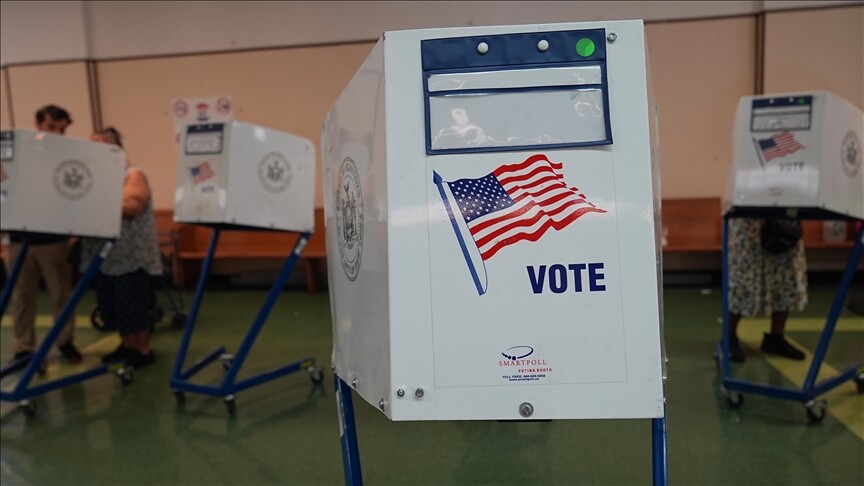 Washington, D.C12 minutes ago
Janeese Lewis George leads vote count in Washington, DC Democratic mayoral primary
-

 Cleveland, OH18 minutes ago
Storms trigger tornado warnings, knocks out power to thousands in Northeast Ohio
-

 Austin, TX24 minutes ago
Texas Volts begin first home slate Thursday at Dell Diamond
-

 Alabama27 minutes ago
Alabama’s Self-Proclaimed ‘AI Watchman’ Unseats Incumbent Public Service Commissioner – Inside Climate News
-
 Alaska33 minutes ago
Gagnon Coal Seam Fire reported near Healy
-
Arizona40 minutes ago
GOP candidates pitch themselves the person to beat Arizona’s Democratic governor


