We’re in an age where you can realistically delegate tasks to smart hunks of metal, whether it’s a self-driving car or a robot that can clean on your behalf. Most of us probably won’t be able to afford the helpful sentient humanoids being developed in our lifetimes, but robot vacuums are an affordable way to experience that promised utopia today, especially now that Amazon’s Big Spring Sale has arrived.
Technology
Our favorite robot vacuum deals from Amazon’s Big Spring Sale


Today’s floor cleaners are also more advanced than ever. In addition to vacuuming, many of the best models can now mop, allowing you to tackle both carpet and hardwood flooring. Some can automatically dispense of their trash and dirty water, too, and clean their own components without intervention. Soon, we’ll even have models that can pick up dirty laundry and purify the air in your home, preventing you from having to lift a finger.
But if you need something relatively affordable for daily cleaning, you’d be surprised how little you have to pay for premium features. Below, we’ve listed the best deals currently available on a slate of Verge-approved robot vacuums, whether you prefer a budget entry-level model from Yeedi or top-of-the-line offerings from iRobot, Dreame, and more.
Roborock’s S8 MaxV Ultra — our pick for the best robot vacuum overall — is available from Amazon, Best Buy, and Roborock for $999.99 ($800 off), which is an all-time low. The combination of a 10,000Pa suction power and dual rubber roller brushes makes it a terrific vacuum, one that can easily pick up pet hair and other debris. It can also mop with great efficiency thanks to a sonic mopping system that vibrates the mop pad 4,000 times a minute, allowing it to clean sticky juices, thick condiments, and other common spills. The mop arm can extend to cover corners and baseboard edges, too.
The S8 MaxV Ultra’s camera-equipped AI obstacle avoidance makes it the best navigator in Roborock’s lineup and one of the top models overall, though it’s not quite as strong as Roomba’s. The mobile app offers ample options to customize cleaning zones and schedules, and you can use its dedicated voice assistant to start and stop routines. That said, it’s also a Matter-ready robot that’s compatible with Alexa, Google Home, and Apple Home.

$1000
With top-notch vacuuming performance, an easy-to-use app, and built-in voice control, the S8 MaxV Ultra is a superb vacuum and good mop. It features Roborock’s best obstacle detection, innovative features like dirt detection, and a hands-free dock that makes it an expensive but excellent choice.
The Roborock S8 Pro Ultra, which is almost identical to the aforementioned S8 MaxV, is currently matching its all-time low of $899.99 ($700 off) at Roborock’s online storefront and Amazon, if you’re a Prime member. The main difference is that the Ultra lacks an RGB camera — meaning it isn’t as good at avoiding obstacles — but that might be a positive if you prioritize privacy. It’s also limited to 8,000Pa of suction power and lacks a built-in voice assistant, as well as support for Matter.


$900
The Roborock S8 Pro Ultra is similar to our favorite robot vacuum on the market, the S8 MaxV. It cleans carpets and mops well, but lacks a camera, a built-in voice assistant, and Matter support.
The Roborock S8 Plus is another great robot vacuum / mop hybrid that’s available from Roborock and Amazon for $499.99 ($500 off), matching its all-time low. It offers a vibrating mop pad that scrubs floors well, and, like the S8 MaxV Ultra, it features dual rubber roller brushes. It’s not as powerful as the MaxV Ultra given its 6,000Pa of suction, but it still does a good job of sucking up dirt from carpets. It also lacks a water tank, though you do get good obstacle detection and a smaller auto-empty dock that saves space.


$350
Roborock’s hybrid S8 robot vacuum and mop features 6,000Pa of suction and sonic moping, which means its flat mop pad vibrates to scrub floors. It has dual rubber roller brushes that do a great job on carpet, and it can lift its mop to avoid carpet. It also has an auto-empty dock option.
The big-wheeled Roborock Q5 Pro is down to $179.99 ($250 off) at Roborock’s online storefront and Amazon (with a coupon), which is $40 more than its all-time low. Not only is it one of the most affordable robovacs you can buy, but thanks to its dual rubber roller brushes and 5,500Pa of suction power, the entry-level Roborock model remains one of the best we’ve found at dealing with unwanted pet hair.
The lidar-mapping Q5 Pro features voice controls, digital keep-out zones, and mopping pads with an onboard reservoir, but no self-cleaning functions. This particular SKU doesn’t include a self-emptying base, but the 770ml dust bin is one of the largest you’ll find, so you can go a few weeks without touching it. That being said, Roborock sells a version with a self-emptying dock, which is also on sale right now for $299.99 ($400 off).


$180
It’s not fancy, but the Q5 Pro has a huge bin and big wheels to get up on higher-pile carpets easily. It has a small removable mopping reservoir for when there are dirty paws on the floors, but its main job is to suck up dirt and pet hair, and it does very well at both.
The Dreame X40 Ultra is another mopping robot, and while it’s on the more expensive side, you can currently pick it up for $899.99 ($600 off) at Amazon and from Dreame. You’re paying a premium for 12,000Pa of suction power and a pair of removable, self-retracting mop pads, which it can automatically clean and dry on its own using the included base. It can also empty its own bin and refill its own water tank.
The Dreame X40 Ultra features an extendable side brush and mop pads, too, offering better coverage for baseboards, corners, and the underside of your furniture. It uses a combination of AI-powered cameras and “3D-structured light” (presumably based on lidar technology) to map and navigate rooms, with customizable keep-out zones and more functions available in the app. There’s also a dirt detection system that can identify messier spills and adjust its cleaning routine accordingly.


$900
With a unique ability to remove and reattach its mop pads, the Dreame X40 solves the problem of vacuuming carpets (with 12,000Pa suction power) while also mopping hard floors. Its mops can also swing out and under low furniture, getting where most bots can’t reach.
The Dream L20 Ultra is available for a new low of $549.99 ($450 off) from Dreame (with promo code L20U50) or from Amazon when you clip the on-page coupon. The L20 Ultra is an excellent alternative to Dreame’s newer flagship robots, including the X40. It lacks a bit of power in comparison, though its 7,000Pa of suction power is still enough for most cleaning jobs. It also doesn’t have the L40’s tri-cut brush, which makes the step-up model more efficient at picking up pet hair. The only other real advantage the X40 holds over the L20 is its self-extending arms for vacuuming (though the dual mop pads can extend a bit for baseboard and corner coverage), nor does it have dirt detection.
The L20 Ultra’s base station is rather large, but it can take care of the entire cleaning process, including emptying the dustbin, emptying and refilling the water tanks, and washing and drying the mop pads. It doesn’t have a heated cleaning function for the mop pads, however. It uses a lidar-based AI-powered navigation system, and you can prompt it to start cleaning by voice using Amazon Alexa and Google Assistant voice commands.


$550
The L20 Ultra is a great all-around bot that can remove its mop pads to vacuum carpet and do the splits with its mops to better clean your baseboards. It has 7,000Pa suction, a bigger base station, and fewer advanced cleaning features than the newer X30 and X40 Ultra models, but it’s still an excellent robot vacuum.
The SwitchBot S10 is on sale for a new low of $459.99 ($740 off) at SwitchBot’s online storefront right now when you use coupon code MDYLOM. The S10 is one of the most affordable robot vacuum / mop hybrids you can buy, one that can refill its own tank so long as you hook the battery-powered base station into your home’s plumbing. It can also dry its own mop pads and empty its own bin at a separate docking bay, and offers enough capacity to run for up to 90 days without intervention.
The S10’s self-cleaning roller mop is more effective than the typical pads we see in most other units, but it’s also limited to a smaller coverage area. It only has a single roller brush for vacuuming, but its respectable 6,500Pa suction can make up for it. And while it has lidar mapping and AI-powered obstacle avoidance, we found it still has a tendency to get stuck on laundry, bath mats, and other obstacles. The S10 is also one of the few robovacs with Matter support, however, which effectively enables native control through Apple Home, Google Home, and Alexa (though said platforms don’t yet fully support robot vacuums).
Read our SwitchBot S10 review.


$414
The S10 is a great mopping robot with a battery-powered water refill dock that makes it the most hands-free robovac we’ve tested. A separate auto-empty dock takes care of the dust. It’s big and loud and lacks some features found on high-end robots, but it does a great job of keeping your floors clean.
The SwitchBot K10 Plus is available for an all-time low of $199.99 ($200 off) from Amazon when you clip the on-page coupon, or directly from SwitchBot for the same price with promo code LMTM120. At 3.6 inches high and 9.8 inches wide, it’s a more petite option if you want something that can maneuver tighter spaces, which it does to decent success with a lidar-based mapping system that supports digital keep-out zones. It only has 2,500Pa suction, but that should be powerful enough to lift dirt in all but the deepest carpeting. You can also attach disposable mopping pads, though its mopping function doesn’t work well. The K10 Plus comes with a self-emptying dock that can hold a respectable four liters of dirt before it needs emptying.


$200
The smallest robot vac on the block, the K10 Plus, doesn’t compare to the other bots here in terms of performance, but if you have a small space where other vacs can’t get to, it’s better than nothing. It’s also very quiet, making it ideal for small spaces like home offices and bedrooms or a very small studio apartment.
The Eufy X10 Pro Omni, our current pick for the best midrange robot vacuum / mop, is available from Amazon, Best Buy, and Eufy (with promo code WS7DV2S4CQPW) for $549.99 ($350 off), which matches the all-time low we last saw during Black Friday and Cyber Monday.
The X10 Pro Omni is a bit of a novelty, at least in comparison to other robovacs in its price range, in that it offers AI-powered obstacle detection, which allows it to deftly navigate cables and other clutter. It also features a slew of functions you’d expect from top-of-the-line models, including 8,000Pa of suction power, speedy lidar-powered mapping, and oscillating dual spinning brushes for mopping.
Mind you, none of these features are as effective as they are on more premium models, though the result is an all-in-one bot that punches above its weight. Plus, it has heated mop drying and onboard water reservoir, the latter of which prevents it from having to return to its multifunction auto-empty / wash / fill dock too frequently.


$550
The X10 is a great robovac with excellent AI-powered obstacle detection, powerful oscillating mops, a user-friendly app, and good mapping capabilities.
The Yeedi Cube is currently down to an all-time low of $259.99 ($230 off) at Amazon for Prime members. It’s not easy to find a self-emptying / self-cleaning vacuum at this price, as those features are typically only available on robots that cost upward of $600 or more.
With 5,100Pa of suction power, the Cube can tackle most common vacuuming scenarios, though its single hybrid rubber / bristle brush can get easily tangled with pet hair. It mops better than most models in its range, however, namely because its vibrating microfiber pads can actually scrub your floors. The Cube uses lasers for object avoidance, too, though it’s not as effective for navigation as those with lidar and AI smarts. It can avoid large furniture and other objects, but it might need your help rerouting around cables, toys, and laundry. Still, we found it navigates better than most other robots under $300.


$260
One of the first robots that can vacuum, mop, self-empty, self-wash, and self-dry with hot air for under $1,000, the Yeedi Cube is an older model that currently retails for under $500. It’s a good vacuum and mop for hands-free cleaning on a budget.


$199
The Roomba Combo i5 Plus is the company’s budget vacuum and mop robot with room mapping features but no virtual keep-out zones.


$250
A truly basic budget bot, the Shark has good suction power, a big bin, and a roller brush made of bristle and plastic that doesn’t get tangled up easily. There’s no mapping, keep out zones, or obstacle detection, but the bot does offer big wheels that easily roll over obstacles and high transitions between rooms. It’s easy to buy replacement parts, too, making this one that can go for years.



Not only is it the first release to support the upcoming Steam Machine living room gaming PC, it comes with long-awaited features for Valve’s handhelds and more support for other companies’ handhelds than we’ve seen to date — including Microsoft and Asus’ Xbox Ally series, the Lenovo Legion Go 2, the OneXPlayer X1, and additional support for MSI, GPD, Anbernic, OrangePi, and Zotac.
The one that excites me most: Valve is adding genuine hibernation and “memory power down” modes to the Steam Deck — though just the LCD model to start — which should help extend battery life when you hit the power button or leave them idle. Some Windows machines currently last longer than the Steam Deck when asleep, because they self-hibernate to save power, while the Steam Deck has an instant-on sleep mode.
Plus, Valve has finally added a setting in its gaming mode to let you use your Bluetooth headset microphones — something I’ve been asking for since the beginning. (Valve did add it to the Linux desktop mode last year.) And the Steam Deck LCD is finally getting Bluetooth Wake re-enabled, so you can turn on your TV-connected Deck with a wireless controller from your couch.
The update comes with all sorts of improvements for the Linux desktop modes that sound like they’ll come in handy on a Steam Machine plugged into a TV or monitor, too, including desktop HDR, VRR display support, per-display scaling, “improved windowing behavior for games running in Proton,” and an upgrade to KDE Plasma 6.4.3 among other things.
And for a Steam Machine or Steam handheld plugged into a home entertainment system, they can now detect how many audio channels you have over HDMI to enable surround sound. (I believe surround sound was already a thing, so perhaps this is just a different and better automatic implementation.)
There’s also a new Arch system base and an updated graphics driver.
Perhaps most surprisingly, the “Non-Deck” section of the changelog is huge. Valve says long-pressing your power button should work “across a wide variety of devices” to power off, restart, or switch to the desktop mode. You should be able to change your processor’s power modes on the Xbox Ally now, and night mode and screen color settings should work on AMD Z2 Extreme handhelds in general.
There’s also “Greatly improved video memory management with discrete GPU platforms,” you can limit how far the battery charges in any of the Lenovo Legion Go handhelds (in desktop mode), and it should fix “washed out colors for Zotac and OneXPlayer handhelds with OLED.”
There’s a lot in this update, and it’s possible I missed a feature you care about, so check out the whole changelog here and below.

Under the five-year contract, Gecko will begin work on 18 ships in the U.S. Pacific Fleet, with the initial award valued at up to $54 million. The contract vehicle is structured to allow other military services to access the technology as well. (Gecko Robotics )
NEWYou can now listen to Fox News articles!
Welcome to Fox News’ Artificial Intelligence newsletter with the latest AI technology advancements.
IN TODAY’S NEWSLETTER:
– WATCH: Wall-climbing robot swarms crawl US Navy warships as China’s fleet surges
– OPINION: AI comes with a hefty charge, and you are the one who gets stuck with the bill
– Dell workforce shrinks 10% for third consecutive year
Swarms of wall-climbing robots will soon be crawling across U.S. Navy warships in a $71 million effort to slash repair delays and boost fleet readiness as China continues expanding its naval power. (Gecko Robotics )
TECH AT SEA: WATCH: wall-climbing robot swarms crawl US Navy warships as China’s fleet surges – Fox News Digital reports on a new development in naval technology, featuring wall-climbing robot swarms that are crawling on U.S. Navy warships. This advancement comes at a critical time in defense politics as China’s naval fleet continues to surge in size and capability.
WALLET SHOCK: OPINION: AI comes with a hefty charge, and you are the one who gets stuck with the bill – In this opinion piece, the author discusses the economic implications of the growing artificial intelligence industry. The article argues that the hefty costs associated with AI development and its massive energy infrastructure will ultimately be passed down, leaving everyday consumers to foot the bill.
Dell Technologies headquarters in Round Rock, Texas, US, on Sunday, Nov. 26, 2023. (Sergio Flores/Bloomberg via Getty Images)
COST CRUNCH: Dell workforce shrinks 10% for third consecutive year – Fox Business reports that Dell’s workforce has shrunk by ten percent. This marks the third consecutive year of workforce reductions for the major technology company amid shifting economic conditions and corporate restructuring.
AIMING HIGH: FULL AUTONOMY: AI pilot technology advances towards military capability – Merlin CEO Matt George details how the company is using artificial intelligence to enable military and commercial aircraft to operate fully autonomously on Fox Business’ ‘The Claman Countdown.’
Single family homes in a residential neighborhood in San Marcos, Texas, US, on Tuesday, March 12, 2024. (Photographer: Jordan Vonderhaar/Bloomberg via Getty Images)
SHOULD I BUY?: Homebuyers, sellers turning to AI chatbots for advice – Prairie Operating Co.’s Lou Basenese and real estate broker Kirsten Jordan discuss how artificial intelligence is impacting homebuyers and sellers on ‘Fox Business In Depth.’
DISRUPTION IS HERE: Charles Payne: AI disruption is here – Fox Business host Charles Payne discusses the economic impact of the rise in artificial intelligence on ‘Making Money.’
BUILDING HER BUSINESS: How Angie Hicks turned Angi into a home services giant and AI player – Angi co-founder Angie Hicks discusses entrepreneurship, company growth and how she built out her business on ‘Mornings with Maria.’
FOLLOW FOX NEWS ON SOCIAL MEDIA
Facebook
Instagram
YouTube
X
LinkedIn
SIGN UP FOR OUR OTHER NEWSLETTERS
Fox News First
Fox News Opinion
Fox News Lifestyle
Fox News Health
DOWNLOAD OUR APPS
Fox News
Fox Business
Fox Weather
Fox Sports
Tubi
WATCH FOX NEWS ONLINE
Fox News Go
STREAM FOX NATION
Fox Nation
Stay up to date on the latest AI technology advancements, and learn about the challenges and opportunities AI presents now and for the future with Fox News here.

For almost two hours last week, Meta employees had unauthorized access to company and user data thanks to an AI agent that gave an employee inaccurate technical advice, as previously reported by The Information. Meta spokesperson Tracy Clayton said in a statement to The Verge that “no user data was mishandled” during the incident.
A Meta engineer was using an internal AI agent, which Clayton described as “similar in nature to OpenClaw within a secure development environment,” to analyze a technical question another employee posted on an internal company forum. But the agent also independently publicly replied to the question after analyzing it, without getting approval first. The reply was only meant to be shown to the employee who requested it, not posted publicly.
An employee then acted on the AI’s advice, which “provided inaccurate information” that led to a “SEV1” level security incident, the second-highest severity rating Meta uses. The incident temporarily allowed employees to access sensitive data they were not authorized to view, but the issue has since been resolved.
According to Clayton, the AI agent involved didn’t take any technical action itself, beyond posting inaccurate technical advice, something a human could have also done. A human, however, might have done further testing and made a more complete judgment call before sharing the information — and it’s not clear whether the employee who originally prompted the answer planned to post it publicly.
“The employee interacting with the system was fully aware that they were communicating with an automated bot. This was indicated by a disclaimer noted in the footer and by the employee’s own reply on that thread,” Clayton commented to The Verge. “The agent took no action aside from providing a response to a question. Had the engineer that acted on that known better, or did other checks, this would have been avoided.”
Last month, an AI agent from open source platform OpenClaw went more directly rogue at Meta when an employee asked it to sort through emails in her inbox, deleting emails without permission. The whole idea behind agents like OpenClaw is that they can take action on their own, but like any other AI model, they don’t always interpret prompts and instructions correctly or give accurate responses, a fact Meta employees have now discovered twice.
California37 seconds ago
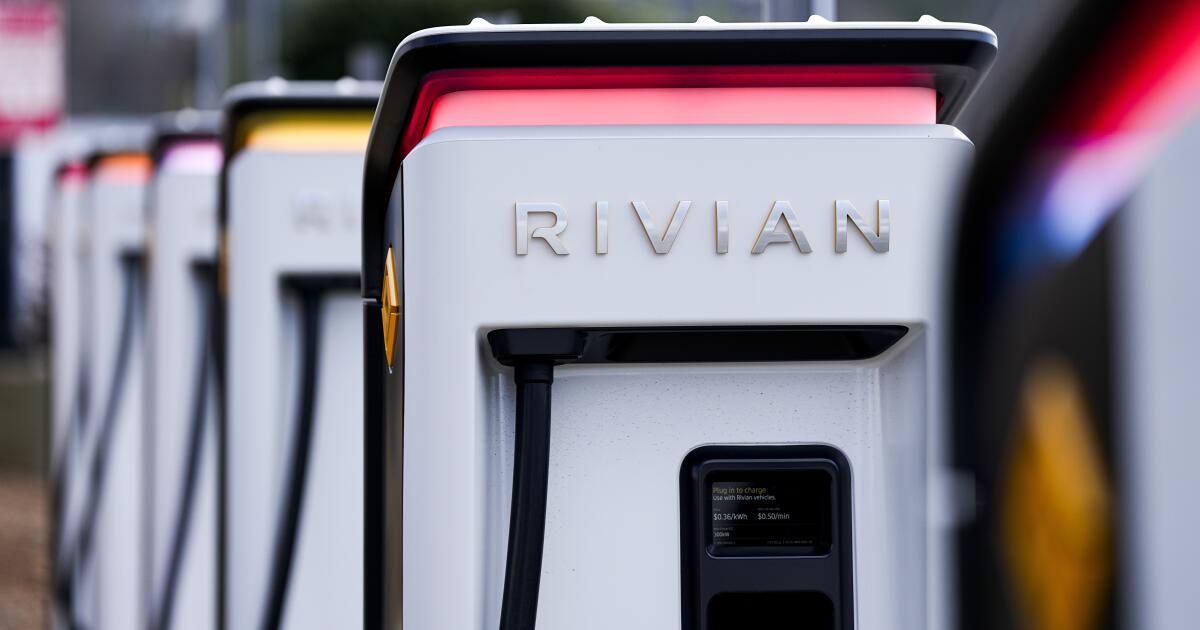
Uber and Rivian plan to bring robotaxis to California

Colorado7 minutes ago
Where to watch Michigan State vs. Colorado State in March Madness First Round: Time, TV Channel

Connecticut13 minutes ago
SCORE Events And Webinars For Western Connecticut

Delaware19 minutes ago
Delaware County crossing guard resigns after attack in Darby Borough, Pennsylvania

Florida25 minutes ago
Central Florida man arrested after Miami Beach hit-and-run crash leaves 2 pedestrians dead, police say

Florida1 year ago
Florida High School Football Rankings: Top 25 teams – Oct. 21

Oregon2 years ago
How old is Bo Nix? What to know about Oregon quarterback ahead of 2024 NFL Draft

Connecticut2 years ago
Cleary's 21 help Le Moyne down Central Connecticut State 69-64 in OT

Virginia2 years ago
99th annual Pony Swim held in Virginia

Indiana2 years ago
Indiana Members Credit Union announced as new anchor tenant at Bottleworks District

Politics6 hours ago
Meet the longtime biz partner of Ilhan Omar’s husband as questions swirl over her skyrocketing net worth

World7 hours ago
‘Nobody can blackmail us’: Leaders excoriate Orbán’s veto

News8 hours ago
Trump is dismantling democracy at ‘unprecedented’ speed, global report finds

Politics18 hours ago
4 House Dems vote against Women’s History Museum bill over biological women-only amendment, Republican claims

World20 hours ago
Iran attacks cut 17% of Qatar’s LNG capacity for up to 5 years: QatarEnergy
-

 Oklahoma6 days ago
Family rallies around Oklahoma father after head-on crash
-

 Detroit, MI1 day ago
Drummer Brian Pastoria, longtime Detroit music advocate, dies at 68
-

 Nebraska1 week ago
Wildfire forces immediate evacuation order for Farnam residents
-

 Georgia4 days ago
How ICE plans for a detention warehouse pushed a Georgia town to fight back | CNN Politics
-

 Massachusetts1 week ago
Massachusetts community colleges to launch apprenticeship degree programs – The Boston Globe
-

 Alaska5 days ago
Police looking for man considered ‘armed and dangerous’
-

 Colorado1 week ago
‘It’s Not a Penalty’: Bednar Rips Officials For MacKinnon Ejection | Colorado Hockey Now
-

 Southwest1 week ago
Talarico reportedly knew Colbert interview wouldn’t air on TV before he left to film it