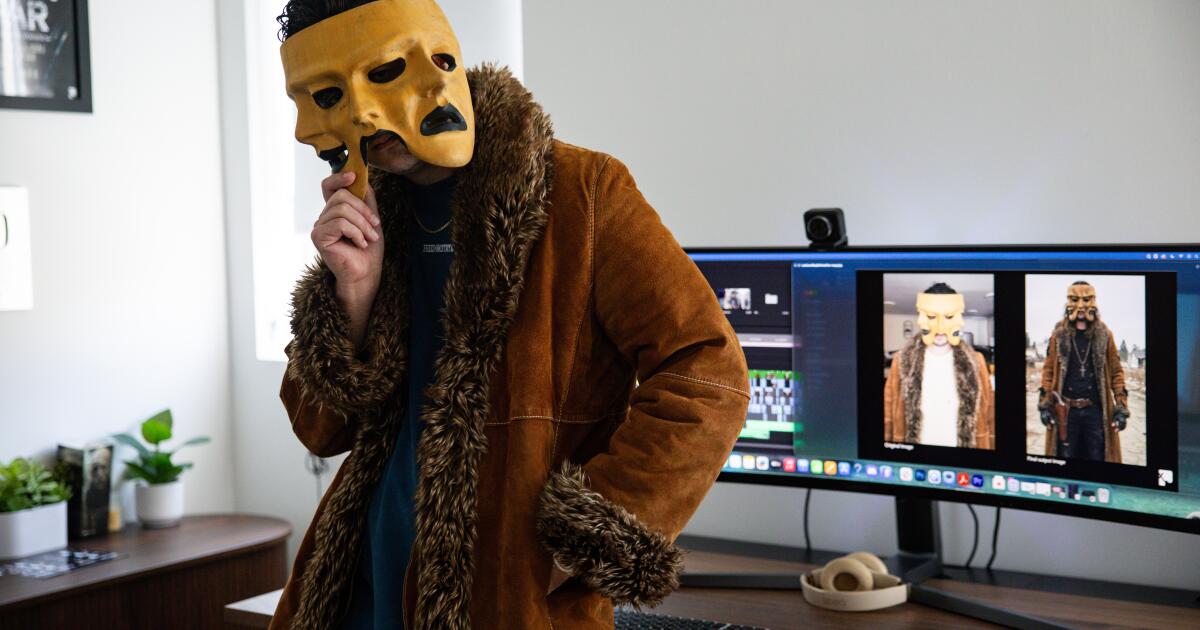
Erick the Architect is a founding member of, and the primary producer for, the legendary Flatbush Zombies. He’s toured the world, performed on Kimmel and Fallon, played Coachella, and collaborated with everyone from Joey Bada$$ and the Rza to James Blake and hardcore punk band Trash Talk. But perhaps the most unexpected collab was with Apple, when Erick popped up following Tim Cook’s final WWDC presentation to rap about apps. That was just a precursor to him dropping his new disco and reggae-tinged single, “No Doubt (I’m In Love).”
Technology
How to transform your photos into fun stickers on your Android


Have you ever wanted to add a personal touch to your messages and photos by creating your own custom stickers? Well, get ready because I’m about to walk you through the super simple process of making stickers right on your Android device. It’s a fun and creative way to express yourself, and trust me, it’s easier than you might think. If you have an iPhone, you can also learn how to transform your photos into fun stickers by clicking here.
GET SECURITY ALERTS, EXPERT TIPS – SIGN UP FOR KURT’S NEWSLETTER – THE CYBERGUY REPORT HERE
A woman holding an Android phone (Kurt “CyberGuy” Knutsson)
Choose your sticker image
- First things first, open up your Gallery app and pick out an image you’d like to turn into a sticker. It could be a funny photo of your pet, a cool graphic you found online or even a doodle you created yourself. The possibilities are endless.
Steps to choose your sticker image (Kurt “CyberGuy” Knutsson)
HOW TO PROTECT YOUR ANDROID FROM MALWARE
Creating your own stickers on Android
- Once you’ve selected your image, tap on the pencil icon (the edit button).
- Then tap on the smiley face (the decorations menu).
- From there, select Stickers. You’ll see a list of preexisting stickers, but we’re going to create our own masterpiece, so tap on the gallery icon.
Steps to create your own stickers on Android (Kurt “CyberGuy” Knutsson)
- Then tap Create Sticker
- Now, it’s time to get creative. Select the image you want to use for your sticker.
- Then choose the method for cutting it out. You can go with the Shape option for simple cutouts or Snap to Shape.
Steps to create your own stickers on Android (Kurt “CyberGuy” Knutsson)
- Select manually for more precise cuts.
- After making your selection, tap Next.
- Now it’s time to customize your sticker by adjusting the slider to change the thickness of the border.
- Then select the color of the border below that.
Steps to create your own stickers on Android (Kurt “CyberGuy” Knutsson)
- If you want to get fancy, you can even use the eyedropper tool to pick a border color directly from your image. Just drag the selector to the color you want and let go to select it.
- Once you’re happy with your creation, tap Done, and your custom sticker is ready to be used.
HOW TO CANCEL SUBSCRIPTIONS ON AN ANDROID TO SAVE MONEY
BEST ACCESSORIES FOR YOUR ANDROID
How to decorate photos with custom stickers
- Now, let’s put that sticker to work! Navigate back to the Gallery app.
- Choose a photo you’d like to decorate with your new sticker.
- Tap the edit icon (the pencil)
- Then tap the decorations icon (the smiley face)
Steps to decorate photos with custom stickers (Kurt “CyberGuy” Knutsson)
- Select Stickers
- Tap the gallery icon at the bottom left
- Either create a new sticker by clicking the plus sign
- Or select your pre-made one from the list.
Steps to decorate photos with custom stickers (Kurt “CyberGuy” Knutsson)
- Move your sticker around to position it on the photo.
- Use the small window above the sticker to duplicate it.
- Flip it horizontally
- Or delete it, if needed
Steps to decorate photos with custom stickers (Kurt “CyberGuy” Knutsson)
- When you’re satisfied with the placement, tap Save to save your picture with the new sticker design.
Steps to decorate photos with custom stickers (Kurt “CyberGuy” Knutsson)
HOW TO CHANGE YOUR PRIVACY SETTINGS ON ANDROID
How to share the sticker you’ve made
- To share your picture with friends and family, tap the share icon
- Choose your preferred messaging app from the list of sharing options
- Select the contact you want to send the sticker-decorated photo to
- Then tap Done
Steps to share the sticker you’ve made (Kurt “CyberGuy” Knutsson)
- Finally, send it off just like you would a normal text message by clicking the up arrow.
Steps to share the sticker you’ve made (Kurt “CyberGuy” Knutsson)
SUBSCRIBE TO KURT’S YOUTUBE CHANNEL FOR QUICK VIDEO TIPS ON HOW TO WORK ALL OF YOUR TECH DEVICES
Kurt’s key takeaways
Creating your own stickers on Android is not only fun but also a great way to add a personal touch to your messages and photos. With just a few taps and some creativity, you can turn any image into a unique sticker that reflects your personality. So, what are you waiting for? Grab your Android device and start sticker-izing your world today.
If you could design the perfect sticker to represent a pivotal moment in your life, what would it look like and why? Let us know by writing us at Cyberguy.com/Contact.
For more of my tech tips and security alerts, subscribe to my free CyberGuy Report Newsletter by heading to Cyberguy.com/Newsletter.
Ask Kurt a question or let us know what stories you’d like us to cover.
Follow Kurt on his social channels:
Answers to the most asked CyberGuy questions:
Copyright 2024 CyberGuy.com. All rights reserved.


NEWYou can now listen to Fox News articles!
Pudu Robotics has announced what it calls the first “full-scenario robot-serviced hotel.” The project will use robots across the entire guest experience, from reception and room service to cleaning, food preparation and guest support.
The hotel is set to open in 2027, with trial rooms and robot-powered services expected to begin in late 2026. Early guests will be able to try robot check-in and autonomous in-room delivery before the full launch.
Sign up for my FREE CyberGuy Report
- Get my best tech tips, urgent security alerts and exclusive deals delivered straight to your inbox.
- For simple, real-world ways to spot scams early and stay protected, visit CyberGuy.com – trusted by millions who watch CyberGuy on TV daily.
Plus, you’ll get instant access to my Ultimate Scam Survival Guide free when you join.
COULD THE NEXT CHINESE THREAT WALK INTO YOUR KITCHEN ON TWO BATTERY-POWERED LEGS?
Pudu Robotics says its robot-run hotel will use AI-powered machines across check-in, room service, cleaning and guest support. (Pudu Robotics)
Where the robot-run hotel will be located
The hotel will sit on West Artificial Island, a man-made island tied to the Shenzhen-Zhongshan Link in Guangdong Province. That cross-sea bridge and tunnel project is one of the Pearl River Delta’s biggest transportation projects.
The location feels fitting. Shenzhen already has a reputation as one of China’s major technology hubs. Room-service delivery robots are already common in hotels across many large Chinese cities.
However, this project goes much further. Instead of adding a few robots to assist hotel staff, Pudu wants to create a connected robot service system that can handle the entire guest experience.
What robots will do inside the hotel
The planned hotel will include 44 high-end rooms, a restaurant, a gym and other guest spaces. Robots will take on roles across the property, including reception, room service, cleaning, food preparation and guest support.
That means you could check in with a robot, have luggage delivered by a robot and order drinks from your phone without calling the front desk. Then, cleaning robots would handle waste detection and room upkeep using AI.
Pudu says its robots will work from one shared intelligence framework. In other words, different machines will handle different jobs while staying connected through the same software system.
The robot staff behind the scenes
Pudu’s FlashBot will run an intelligent vending system, allowing guests to order drink deliveries by smartphone. The PUDU T300 will move luggage from the lobby to rooms.
Meanwhile, the PUDU CC1 Pro and PUDU MT1 cleaning robots will handle cleaning tasks using AI waste-detection technology.
At the Shenzhen launch event, BellaBot Pro served coffee while KettyBot Pro delivered refreshments and snacks. That kind of robotic service may still surprise many travelers. In Shenzhen, though, it already fits into a broader tech culture where robot baristas and drone food delivery are becoming more visible.
HUMANOID ROBOTS WORK NONSTOP IN PACKAGE TEST
Guests will be able to try robot check-in and autonomous in-room delivery during the hotel’s first public trial in late 2026. (Pudu Robotics)
How AI will run the hotel experience
The hotel will rely on PuduFM 1.0, the company’s embodied intelligence foundation model. It will also use PuduAgent to manage intelligent operations across the hotel.
“This partnership represents an important step toward large-scale deployment of embodied intelligence in premium hospitality environments,” said Cong Guo, co-founder and CTO of Pudu Robotics.
He also said the project gives the company a chance to explore new service models where AI and robotics work together to deliver connected service experiences.
That may sound ambitious, yet the rollout will be gradual. The first public trial is expected in late 2026. A broader hotel opening is planned for 2027.
Why China is moving fast with robot hospitality
China has already embraced service robots in hotels, restaurants, airports and public spaces. The robot-run hotel takes that trend into a more advanced phase.
Shenzhen Culture & Tourism Industry Development will work with Pudu Robotics to turn West Artificial Island into a robotics and technology destination. The hotel is only one part of that larger plan.
Over the next four years, the island is expected to add more robotics across tourism and hospitality. That could turn the area into a testing ground for how travelers react when robots handle nearly every service touchpoint.
The hotel is planned as a connected robot service system where different machines handle luggage, deliveries, cleaning and hospitality tasks. (Pudu Robotics)
What this means for you
If this hotel works well, it could change what you expect from travel in the future. Faster check-in, automated deliveries and round-the-clock service may sound convenient, especially when you arrive late or need something quickly.
However, there is another side to this. A robot-run hotel also raises questions about jobs, privacy, safety and what kind of hospitality guests actually want.
Some travelers may love the speed and efficiency. Others may miss the warmth of a person who can read the room, handle a strange request or help when something goes wrong.
That is where this project becomes important. It may show whether people are ready for hotels where AI handles the stay from start to finish.
Watch the CyberGuy Live replay: Lock Down Your Phone in 30 Minutes
Your phone holds your email, passwords, photos, banking apps and personal data. In this free CyberGuy Live replay, Kurt the CyberGuy walks you step by step through simple phone security fixes you can do at your own pace. You’ll learn how to improve your privacy settings, spot the latest phone scams, use trusted security tools and walk away with a simple checklist to stay protected. Watch the replay and get our checklist here: CyberGuyLive.com
Kurt’s key takeaways
China’s first robot-run hotel feels like a major test of how far hospitality automation can go. We have already seen delivery robots roll through hotel hallways. Yet this project puts robots at the center of the entire stay. The convenience could be impressive. You could check in, order drinks, receive luggage and get room support without waiting on a busy front desk. For travelers who value speed, that may feel like a win. Still, hospitality has always been about more than efficiency. A great hotel stay often comes from small human moments. A kind greeting, a helpful suggestion or a quick fix when something goes sideways can make a trip feel easier.
If a robot-run hotel can give you faster service, would you miss the human touch or happily skip the front desk altogether? Let us know by writing to us at CyberGuy.com.
CLICK HERE TO DOWNLOAD THE FOX NEWS APP
Sign up for my FREE CyberGuy Report
- Get my best tech tips, urgent security alerts and exclusive deals delivered straight to your inbox.
- For simple, real-world ways to spot scams early and stay protected, visit CyberGuy.com – trusted by millions who watch CyberGuy on TV daily.
- Plus, you’ll get instant access to my Ultimate Scam Survival Guide free when you join.
Copyright 2026 CyberGuy.com. All rights reserved.

The Swift Observatory was launched in 2004, but recent solar storms have pushed its orbit lower, and it’s in danger of burning up in Earth’s atmosphere as soon as this year. To try and stave off its demise, NASA has enlisted Katalyst Space Technologies. The company’s Link spacecraft launched Friday with the goal of intercepting Swift, which has no propulsion system, and boosting its orbit back to its original position. Right now, Swift is circling at an altitude of 224 miles, and Link is aiming to raise that by about 150 miles.
Using a three-armed spacecraft to lift a satellite 150 miles higher into orbit is challenging enough, but the speed with which Katalyst pulled the mission together makes it even more impressive. NASA required the company to rush the job because Swift would be too low to save by October. $30 million and nine months later, help is on the way for the $500 million Swift.

The new track, produced by Yeti Beats and Federico Vindver, is definitely a shift in tone from the darker, grittier, more boom-bap-grounded sounds Erick is known for. But that’s part of what makes it so compelling. Erick is still looking to experiment and expand his palette this deep into his career. That sense of adventure doesn’t stop him from getting a bit nostalgic for physical phone keyboards and the GameCube, though. It also turns out that Erick was one of just a handful of unfortunate souls who spent their hard-earned money on the Nokia N-Gage.
What is your most indispensable tool?
A moleskine book and a pen.
What is the first app you install on a new phone or computer?
I usually go for Dropbox first so I can pull up the thousands of files I have stored floating around on the internet somewhere.
What is one thing you wish you could change about your phone?
I miss typing on my phone with a physical keyboard like I used to do using a BlackBerry.
What sites do you have pinned to your tab bar?
ESPN, Behance, MyFonts, Fanatics, Topps, eBay, Discord, UPS, FedEx, Whatnot, Plex
How many tabs do you have open right now?
What is your happy place online?
Uh… the screen that says “Your order has been placed” when you buy something online
What is your favorite gadget you’ve ever owned?
Which was the most disappointing?
What game do you have the fondest memories of?
Resident Evil 4 for GameCube. I played this game so many times until my eyes were bloodshot red, and my fondest memory was the huge TV that I played it on. The TVs back then were so big they were actually pieces of furniture. When it came time to move it, you needed like four people to lift up those big tube TVs. Anyhow, I love that game, and I think I’m probably one of the best people at it!
Which tech trend do you wish would go away?
I’m not really a fan of virtual reality and putting things over my eyes to augment my reality… sorry to anyone who is obsessed with those things!
What is one thing you wish you had created?
I wish I had created the song “Bohemian Rhapsody.” It’s such a ridiculous song in the most beautiful way. I can’t compare it to any other piece of music. If I did, I’d have to reference a ton of different songs to make this one. I think if I were the creator of it, people would have no idea what song to expect from me, and that’s pretty cool.
What creation are you most proud of?
If I had a child, my answer would be that — but since I don’t, I would have to say the project I released in 2011 called “Almost Remembered.” It was the catalyst for all of the music I eventually learned how to create, and it gave me the confidence to continue to pursue being a producer and artist. I considered myself an amateur back then, but it was the most creative I’ve felt to date in terms of experimenting with new sounds.
Which are you least proud of?
I don’t want anyone to google the name of the thing I am least proud of hahaha
What’s the best piece of advice you’ve ever received?
My mom told me that everybody has a season, and although it may not be your season now… You have to consider that when it is, that season may last forever. Be patient and wait on it.
What is your current obsession?
What do you do when you need to focus?
Turn my phone off or pretend I don’t have one anymore.
What do you do when you’re feeling stuck?
Again, turn my phone off or pretend I don’t have one anymore.
When was the last time you went somewhere without your phone?
I take walks without my phone all the time, and I use my digital audio player that isn’t connected to the internet whatsoever. I can focus on the music entirely and not be distracted by incoming texts, emails, or social media.
What’s the last piece of physical media you bought?
I bought a bunch of records at VinylCon! a couple of months ago, and I’ve been collecting Absolute Batman and Invincible comics.
What do you think is worth splurging on?
Food and anything you like to collect.
What would the tagline for your biopic be?
“The man with too much on his mind.”
What’s the last GIF or meme you used?
Follow topics and authors from this story to see more like this in your personalized homepage feed and to receive email updates.
-

 Politics4 minutes ago
Expert who fled Cuba warns of ‘vicious cycle’ that will lead to ‘communists in double digits’ in Congress
-

 Health11 minutes ago
July 4 heat delays America 250 celebration as State Fair guests share love of USA
-

 Sports14 minutes ago
Toronto Maple Leafs top pick Gavin McKenna reveals that he’s changing his jersey number
-

 Technology19 minutes ago
China’s robot-run hotel opens to public in 2027
-
 Business26 minutes ago
China-backed AI tool behind fake Brad Pitt fight making Hollywood inroads
-
 Entertainment29 minutes ago
Don Was produced the Rolling Stones, Bob Dylan and Ozzy. At 73, he found his voice in Detroit — and the Dead
-
 Politics41 minutes ago
Commentary: Happy Birthday, America! You’ve weathered another rough year
-
 Sports49 minutes ago
Dodgers’ Eliezer Alfonzo praying his sister and stepmother will be found in Venezuela

